Free online photo editor
A layer-based image editor that opens in a browser tab: masks, healing and clone tools, levels and curves, filters, type and shapes. When the job is small, grab a one-click tool instead to shrink, compress, crop or cut out a background.
- Photos never leave your device
- Free, no sign-up
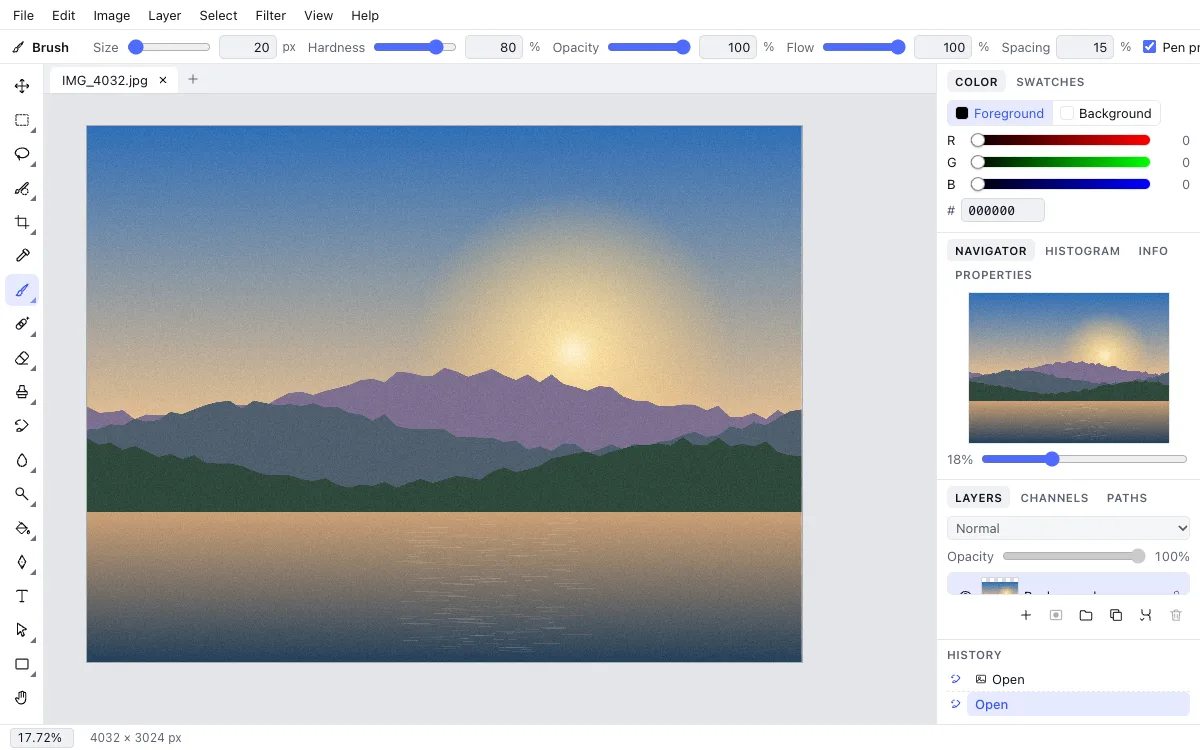
Everything you expect from a desktop editor
If you have used a professional image editor before, you will feel at home: tools on the left, options for the current tool along the top, and Layers, History, Histogram and Color panels on the right. Keyboard shortcuts follow the usual conventions — B for Brush, J for the healing tools, Ctrl+T for Free Transform, Ctrl+Z to undo.
Layers that stay editable
Pixel, type, vector and fill layers, groups, 27 blend modes, layer and vector masks, clipping masks, and adjustment layers you can tweak at any time.
Retouching tools
Spot Healing Brush, Healing Brush, Patch, Clone Stamp, Red Eye, Dodge, Burn and Sponge — remove blemishes, dust, wires and stray objects cleanly.
Precise selections
Marquee, Lasso, Magnetic Lasso, Magic Wand, Quick Selection, Color Range and Refine Edge for hair, fur and soft edges.
Color and tone
Levels, Curves, Exposure, Hue/Saturation, Color Balance, Shadows/Highlights, Selective Color, Gradient Map and dozens of filters.
Type, shapes and paths
Text with font and alignment controls, vector shapes, the Pen tool, and layer styles such as drop shadow, stroke, glow and gradient overlay.
Open and export
Opens JPG, PNG, WebP, GIF, BMP and TIFF. Exports to JPG, PNG, WebP, GIF, BMP and TIFF, or saves a layered .photo project you can reopen later.
One-click image tools
Editor
Size and weight
- Resize image onlineResize an image online to an exact width and height in pixels, or by 25, 50 or 75%.
- Compress imageShrink JPG, PNG or WebP files: pick the quality and see the new file size before downloading.
- Crop imageCrop a photo to the ratio you need: square, 4:3, 16:9 or 9:16 for stories.
Effects
- Rotate imageRotate a photo 90° left or right or 180° and save it.
- Flip imageMirror a photo horizontally or flip it vertically.
- Black and white photoTurn a color photo into black and white with natural tones.
- Blur imageBlur a picture as much as you need: for a background, a cover or to hide details.
- Pixelate imageTurn a picture into a pixel mosaic with the block size you choose.
- Remove background from imageRemove a solid background from an image online and get a transparent PNG for product shots, logos, signatures and icons.
Convert
Get started in three steps
1Open a picture
Click “Open the editor”, then pick a file from your computer or phone — or drag it onto the window. You can also start from a blank canvas at any size.
2Make your edits
Every change lands in History, so you can step back, compare with the original and undo freely. Adjustment layers and masks never touch the original pixels.
3Export or save the project
Download the image in the format and quality you need, or keep a layered project. JPG and WebP suit the web; PNG keeps transparency.
Why people use Zotu Photo
Runs in the browser
No download and no installer: it works on Windows, macOS, Linux and tablets, in Chrome, Edge, Firefox and Safari.
Private by design
The one-click tools process images locally on your device; nothing is sent to a server.
Free, no watermark
No sign-up for the quick tools, no paywalled features, and no logo stamped on your exports.
Fearless editing
A long undo history, snapshots and the History Brush let you experiment without wrecking the photo.
Questions and answers
Is this photo editor really free?
Yes. The editor and the one-click tools are free to use, with no premium tier for features and no watermark. A Zotu account is only needed if you want cloud storage and access from several devices.
Do I need to download anything?
No. Any up-to-date browser will do. The editor loads in a few seconds right on this site.
Does it support layers?
Yes — pixel, type, vector, fill and adjustment layers, plus groups, masks, blend modes and layer styles.
Can I save my work and keep editing later?
Save a .photo project to keep every layer, mask and style. Regular JPG and PNG files flatten the image into a single layer.
Is it good for portrait retouching?
Yes. Use the Spot Healing Brush for skin, Patch or Clone Stamp for larger flaws, Red Eye for flash photos, and Dodge and Burn to shape light.
Does it work on a phone?
The one-click tools work well on phones. The full editor runs on tablets too, but its panels are most comfortable on a larger screen.
Where do my files go?
Downloads go straight to your device. Inside the Zotu desktop you can also save to your cloud storage.
How large can images be?
Up to 8192 pixels on each side and 24 megapixels in total — enough for most camera and phone photos.
Which should I use: a quick tool or the editor?
A quick tool does one job — resize, compress, crop — and hands you the file. The editor is for combining many edits on layers.
Try it on your own photo
The editor opens in seconds — no account, no install. Every tool is one click away.